Followkite resources
Cold email with Namecheap Private Email: rules and setup
Cold email with Namecheap Private Email must comply with its anti-spam terms; technical SMTP access is not permission to send unsolicited commercial or bulk mail. For permitted correspondence, Followkite connects through mail.privateemail.com with encrypted SMTP and IMAP access.
By Followkite. Last updated . Product built by Shahab Dev.
14 days, no card needed. Paid plans from $15 per workspace per month.
Is Namecheap Private Email a bulk-outreach service?
Do not buy or connect this mailbox on the assumption that it authorizes unsolicited outreach. Read the Private Email terms, especially the anti-spam rules, before deciding whether your intended correspondence is allowed. A successful login or a published sending ceiling does not remove these restrictions.
The setup below is for permitted business mail. If you are comparing cold-email infrastructure, provider acceptable use belongs in the buying decision alongside price and limits. Ask Namecheap about an uncertain use case before uploading recipients, not after a mailbox has been restricted.
What are the correct Private Email server settings?
| Field | Value in Followkite |
|---|---|
| SMTP host | mail.privateemail.com |
| SMTP port | 465 SSL/TLS, or 587 STARTTLS |
| IMAP host | mail.privateemail.com |
| IMAP port | 993 SSL/TLS |
| SMTP and IMAP username | Full mailbox address, such as name@example.com |
| Password | The mailbox master or application password, according to account security |
These values come from Namecheap’s official configuration guide. Your domain registrar login is not the mailbox login. Likewise, your website’s cPanel credentials may belong to a different mail service and will not authenticate a Private Email account.
How do you connect permitted business correspondence?
- Confirm the mailbox exists and can sign in through Private Email webmail.
- Check the domain’s mail hosting. A domain purchased at Namecheap is not proof that its email is hosted there.
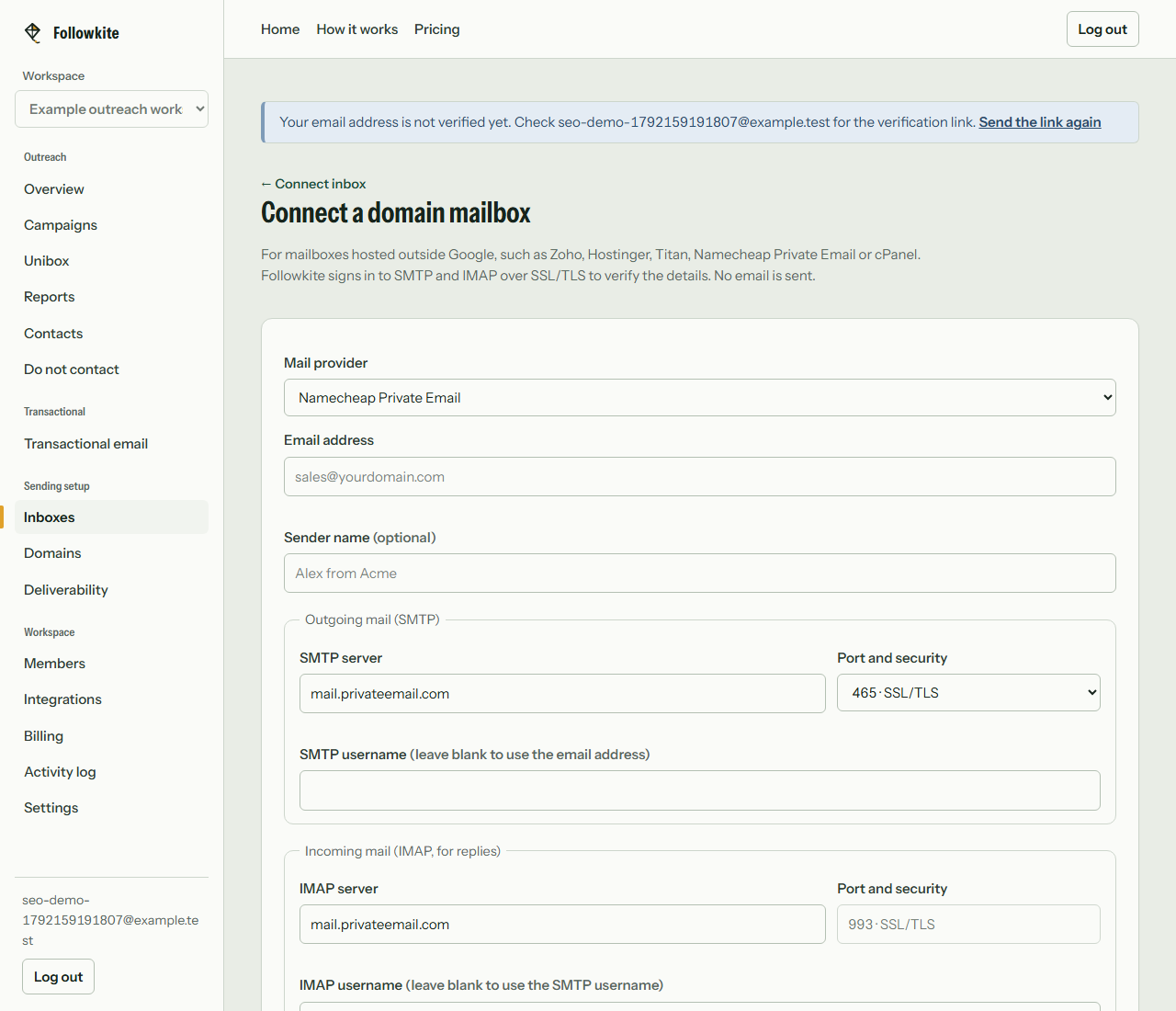
- Open Followkite’s domain-mailbox connection form and select Namecheap Private Email.
- Enter the mailbox address and password. Keep both hosts as mail.privateemail.com.
- Choose encrypted SMTP on 465 or 587 and IMAP on 993.
- Run the connection check, then send a permitted test message to yourself.
- Reply from the receiving test account and confirm synchronization before relying on automatic follow-up stops.
Why would authentication or reply synchronization fail?
Check whether you entered the full mailbox address rather than a short username. Confirm that the password belongs to that mailbox, and whether your security setup requires an application password. If the server rejects access after successful use, inspect the provider’s account status rather than repeatedly retrying the same credentials.
Separate outgoing and incoming failures. A valid SMTP connection can send while an incorrect IMAP login prevents replies from appearing. Followkite reports the failure stage so you can investigate the right server. Use the update-credentials control after password changes and repeat the end-to-end test.
What should you keep separate from connection settings?
Mailbox authentication, domain authentication and permission to contact a recipient are different checks. Publish the DNS records your host requires, confirm your use is permitted, and keep an accurate suppression list. Do not interpret any one successful check as a substitute for the others.
For a team workspace, choose whether Unibox should copy all mail or only campaign-related messages. Use a business mailbox whose content is appropriate for that audience. Disconnecting stops local access and removes stored credentials; deleting an inbox is a separate action that also removes its stored history.
What does Followkite cost?
Plans are billed per workspace. Mailbox hosting and domain registration are separate purchases. Choose a plan by total campaign sends, including follow-ups, rather than the size of your prospect list alone.
| Plan | Monthly price | Inboxes | Campaign emails / month |
|---|---|---|---|
| Starter | $15 | 5 | 3,000 |
| Growth | $40 | 25 | 15,000 |
| Scale | $100 | 100 | 60,000 |
The trial lasts 14 days with Starter limits and every feature. Followkite has no permanent free plan, inbox warm-up network, or guarantee of inbox placement. Review the full pricing and billing terms.
Frequently asked questions
Does SMTP access make unsolicited bulk campaigns acceptable?
No. Namecheap’s Private Email terms govern the mailbox. Do not use Followkite to bypass those rules or to evade a sending restriction.
Which host should I use for a Namecheap domain?
For a mailbox actually hosted on Namecheap Private Email, use mail.privateemail.com. A domain registered at Namecheap can host mail elsewhere, so confirm the mailbox provider first.
Can I connect with IMAP port 143?
Followkite uses IMAP port 993 with SSL/TLS. Choose that option even if another mail client supports STARTTLS on 143.
Build a small campaign you can review
Connect a mailbox you control, check the audience and suppression list, and test with your own address before launching.
Create your workspace