Followkite resources
Cold email with Zoho Mail: check policy before setup
Cold email with Zoho Mail needs a policy check before a connection guide. Zoho Mail is intended for personal and normal business mail, not bulk campaigns. Followkite can technically connect eligible Zoho SMTP/IMAP accounts, but that connection does not override Zoho’s usage policy.
By Followkite. Last updated . Product built by Shahab Dev.
14 days, no card needed. Paid plans from $15 per workspace per month.
Is Zoho Mail intended for bulk cold email?
No. Do not treat Zoho’s normal mailbox service as a bulk-campaign platform. Its usage policy describes normal personal and business use and restrictions around bulk messages. Check whether your intended correspondence is permitted before enabling any sending in Followkite. Lowering a daily cap does not turn prohibited activity into permitted activity.
This page documents the integration for eligible business correspondence and replies. If your intended audience or sending method conflicts with the provider’s rules, do not launch it through this mailbox. Get clarification from Zoho rather than trying alternate hosts to evade a restriction.
Which SMTP and IMAP settings should you use?
| Account or setting | Configuration |
|---|---|
| Paid domain-based organization, US data center | SMTP smtppro.zoho.com; IMAP imappro.zoho.com. |
| Personal / applicable free organization accounts | SMTP smtp.zoho.com; IMAP imap.zoho.com, where external access is included. |
| Outgoing security | 465 with SSL/TLS, or 587 with STARTTLS. |
| Incoming security in Followkite | IMAP 993 with SSL/TLS. |
| Username | The full mailbox email address. |
| Password | Use an application-specific password where required by account security. |
Zoho’s SMTP reference distinguishes account types, and its IMAP guide covers incoming access. Other data centers use different hostnames. Copy the values from your own account’s server configuration; do not guess that every account uses the .com servers.
How do you connect an eligible Zoho mailbox?
- Confirm the plan includes the external access needed for both directions.
- Enable IMAP in Zoho and obtain an app password if the account requires one.
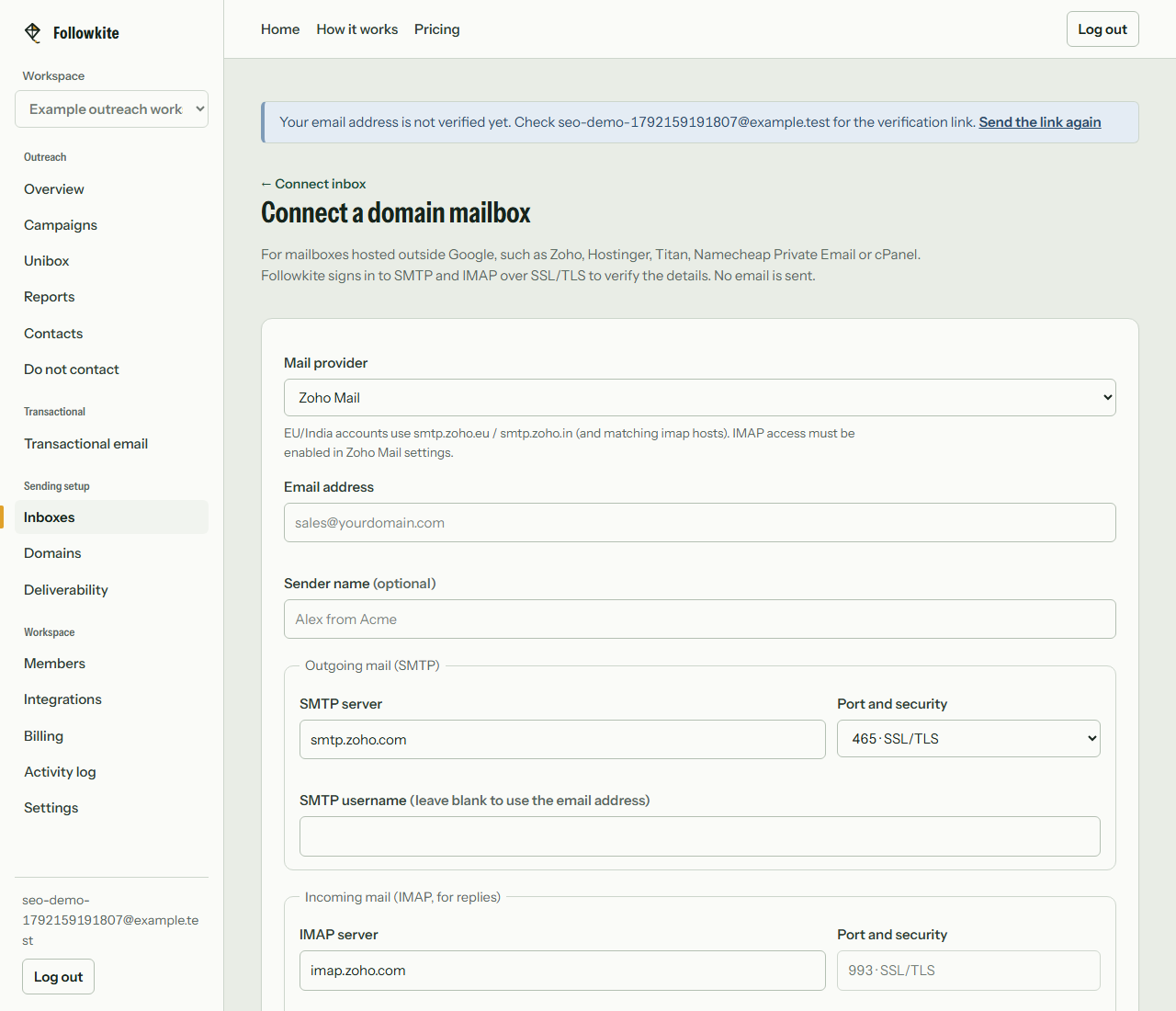
- Open Inboxes, Connect inbox, then the domain-mailbox option in Followkite.
- Select Zoho as a starting preset, then replace the suggested hosts with your actual account’s values. The preset is a hint, not an account lookup.
- Enter the full email address and separate SMTP or IMAP credentials if they differ.
- Connect and check health. The initial connection validates access without sending a message.
- Send a permitted test to an address you control and verify incoming replies before enabling a campaign.
How do you troubleshoot a failed connection?
For an authentication error, check the full username, app password and whether the sending address belongs to the authenticated account. For a server-reachability error, check the data center, hostname and port. Do not disable encryption to make a test pass; Followkite’s supported connection options use TLS.
Check incoming access independently. A working SMTP login says nothing about IMAP permissions. After rotating an app password, update the stored credentials and repeat the send-and-reply test. Keep the mailbox disabled for sending until both checks succeed.
What should you review before enabling sending?
Review provider permission, the audience’s source, suppression records and domain authentication. Use a dedicated business mailbox if a team can access the workspace. Choose whether non-campaign messages should be copied into Unibox, since the sync-all-mail setting affects what teammates may see. Disconnect later removes local passwords and stops that connection’s sending and synchronization while keeping its history.
What does Followkite cost?
Plans are billed per workspace. Mailbox hosting and domain registration are separate purchases. Choose a plan by total campaign sends, including follow-ups, rather than the size of your prospect list alone.
| Plan | Monthly price | Inboxes | Campaign emails / month |
|---|---|---|---|
| Starter | $15 | 5 | 3,000 |
| Growth | $40 | 25 | 15,000 |
| Scale | $100 | 100 | 60,000 |
The trial lasts 14 days with Starter limits and every feature. Followkite has no permanent free plan, inbox warm-up network, or guarantee of inbox placement. Review the full pricing and billing terms.
Frequently asked questions
Can I use a free Zoho account with Followkite?
Confirm that your particular account includes external IMAP and SMTP access. Availability depends on plan, account and region; webmail access alone is not enough.
Should I use smtp.zoho.com or smtppro.zoho.com?
Zoho lists smtp.zoho.com for personal and some free organization accounts, and smtppro.zoho.com for paid domain-based organization accounts. Use the exact server details shown inside your Zoho account, including its data center.
Why does sending work but replies do not sync?
SMTP is outgoing access. Incoming synchronization needs IMAP enabled, the correct incoming host and valid credentials. Check both sides before relying on reply-based stops.
Build a small campaign you can review
Connect a mailbox you control, check the audience and suppression list, and test with your own address before launching.
Create your workspace