Followkite resources
Send cold emails from Gmail automatically
To send cold emails from Gmail automatically, connect your account to a sequence tool, choose a small relevant audience, and schedule a first message plus follow-ups. Followkite sends through your connected Gmail account and stops a contact?s queued follow-ups after a matching human reply is detected.
By Followkite. Last updated . Product built by Shahab Dev.
14 days, no card needed. Paid plans from $15 per workspace per month.
What do you need before connecting Gmail?
Use a mailbox you own and are authorized to connect. For a business domain hosted on Google Workspace, check its SPF, DKIM and DMARC configuration with the person who manages DNS. Keep your normal business correspondence in mind when choosing an outreach volume; the same provider account is used for both.
Choose an audience with a specific business reason to hear from you. Followkite?s acceptable-use rules do not allow bought, rented or scraped lists. Record how you obtained each contact, why the offer fits, and whether the person has already opted out. Automation makes a poor list repeat faster; it does not make that list appropriate.
How do you connect and schedule the first campaign?
- Create a workspace. Keep a client?s campaigns in its own workspace so reporting, contacts, opt-outs and billing stay together.
- Choose Connect inbox, then Google. Review the Google account shown on the authorization screen. Choose the intended business sender rather than a personal account already open in the browser.
- Review the permissions. Sending uses Gmail send access. Unibox and reply detection also need Gmail read access. If read permission is missing, reconnect before relying on automatic stops.
- Check the inbox settings. Set a daily limit and minimum and maximum delays. Newly connected inboxes are not automatically enabled for sending.
- Prepare contacts and copy. Import a clean list and review personalization fallbacks. Use one clear offer and one easy question.
- Set the campaign window. Choose sending days, hours and timezone. Add a wait period before the next step; do not schedule several reminders within the same short session.
- Test the whole loop. Send to an account you control, reply from that account and confirm the enrollment stops after mailbox synchronization.
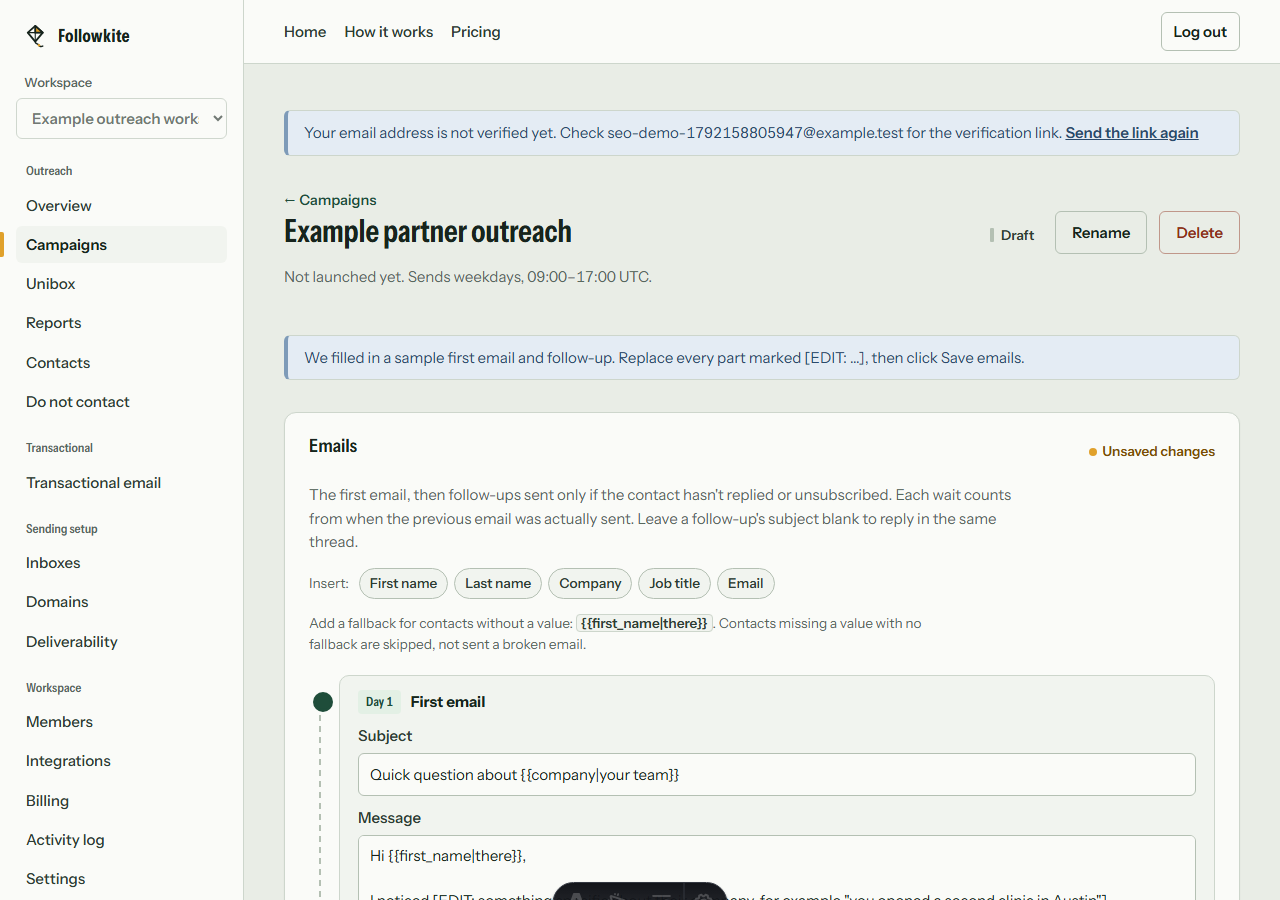
How do you send follow up emails automatically in Gmail?
A useful sequence adds context instead of repeating the same request. Try an initial observation, a later message with a practical example, and a final short check-in. The following timing is a planning example, not a tested conversion benchmark: first email on day one, a relevant follow-up after three days, and a final check-in four days later. Your campaign?s sending window can move actual delivery later.
Each additional step consumes an email send if the contact reaches it. A three-message sequence for 100 contacts can therefore require up to 300 sends, before stops. Followkite allows up to ten steps; a larger sequence is not automatically a better one. Reserve time to answer replies rather than scheduling a campaign you cannot service.
How should you handle cold email from multiple Gmail accounts?
Connect each mailbox separately and verify that its sender name, signature and audience match. The Starter plan supports five inboxes, while larger plans raise the inbox and monthly campaign allowances. Followkite can connect the same Google account to different workspaces, once in each; those copies still use one underlying Google mailbox and share that provider?s account limits.
Use separate client workspaces for separate clients rather than blending their recipient lists. Read replies in the active workspace?s Unibox and confirm the receiving sender before answering. Disconnect removes local credentials and stops that connection?s sending and synchronization while retaining its history for reconnection.
What should you do when Gmail authorization or sending fails?
For an authorization error, confirm the account, requested scopes and application verification status. Google?s unverified-app warning is controlled by its OAuth review process; a new frontend release cannot remove it. Use Google?s unverified-app guidance rather than assuming the warning means your password is wrong.
For a sending limit or a rejected message, pause and investigate the provider error. Google?s personal Gmail limits are technical limits, not a recommended cold-email allowance. Keep your campaign cap below the account?s remaining capacity and follow the sender guidelines. A scheduled message can wait for limits, mailbox health or a campaign window; do not repeatedly recreate it and risk duplicates.
What does Followkite cost?
Plans are billed per workspace. Mailbox hosting and domain registration are separate purchases. Choose a plan by total campaign sends, including follow-ups, rather than the size of your prospect list alone.
| Plan | Monthly price | Inboxes | Campaign emails / month |
|---|---|---|---|
| Starter | $15 | 5 | 3,000 |
| Growth | $40 | 25 | 15,000 |
| Scale | $100 | 100 | 60,000 |
The trial lasts 14 days with Starter limits and every feature. Followkite has no permanent free plan, inbox warm-up network, or guarantee of inbox placement. Review the full pricing and billing terms.
Frequently asked questions
How do I send follow up emails automatically in Gmail?
Gmail scheduling handles an individual message. In Followkite, create a sequence with wait periods, select the connected sender and contact list, then test reply detection before launching.
Can I send cold email from multiple Gmail accounts?
Yes. Connect each account you control as its own inbox, within your workspace plan limits. Multiple accounts do not remove Google?s limits, acceptable-use requirements, or the need to honor opt-outs.
Why does Google show an unverified app warning?
Google controls the OAuth verification warning. Adding yourself as a test user can support testing, but publishing an app is not the same as Google approving its sensitive or restricted scopes.
Build a small campaign you can review
Connect a mailbox you control, check the audience and suppression list, and test with your own address before launching.
Create your workspace